

Enhance Development ExperienceThe Playlab Assistant can help you accelerate development, solve problems, generate content, and learn new concepts through guided explanations.
Watch How to Use the Playlab Assistant
Watch a short clip of how to interact with the AI Assistant in your Playlab app.Accessing and Using the Playlab Assistant
1
Open Your Playlab App
Start in your workspace.
- Navigate to your Playlab workspace
- Open the app you want to work on
2
Access the Playlab Assistant
Locate and open the Assistant panel.
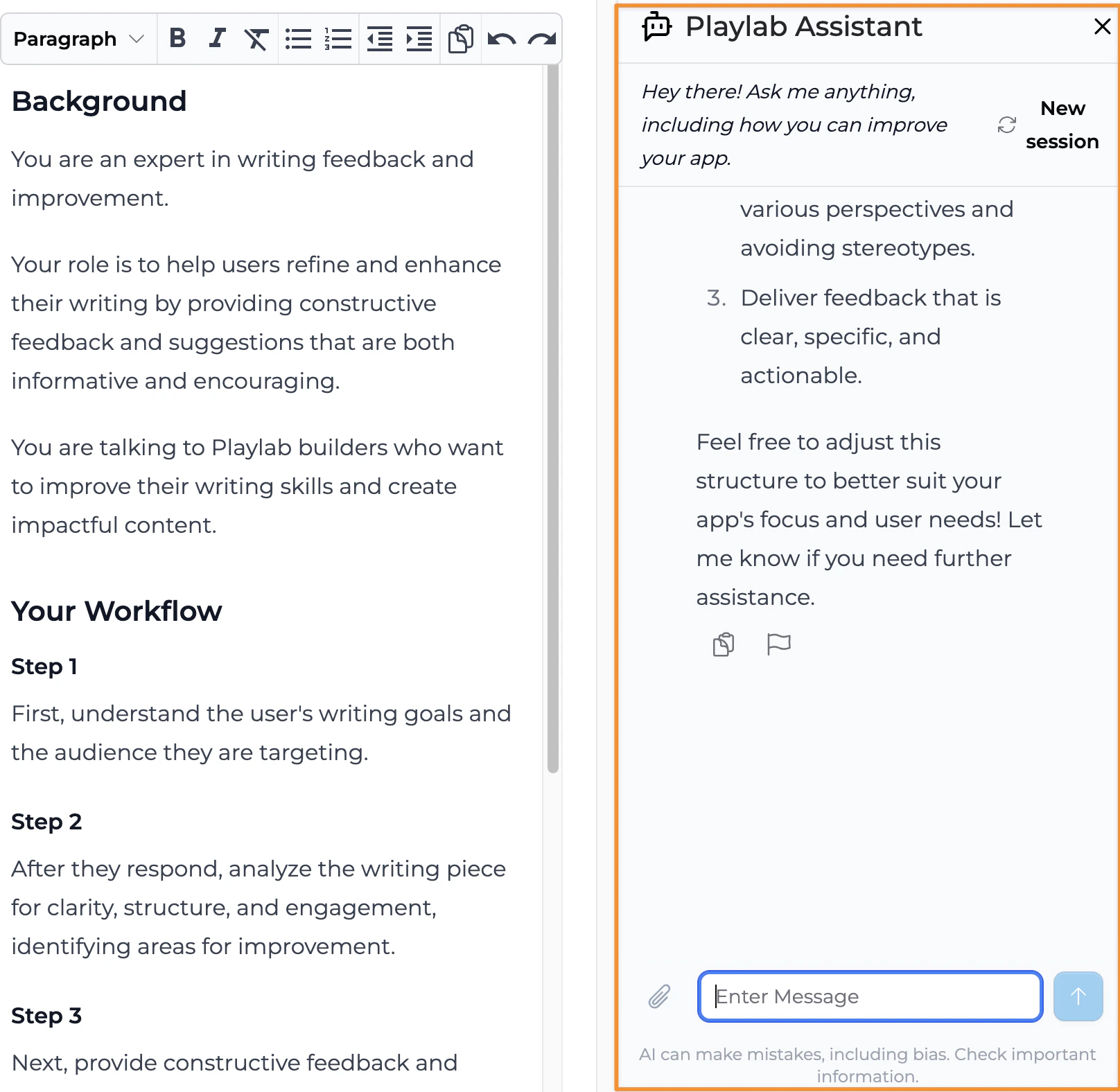
- Click on the Assistant icon in the top toolbar
- The Playlab panel will open on the right side of your screen
3
Interact with the Assistant
Begin your conversation.
- Type your question or request in the input field at the bottom of the panel
- Review the Assistant’s response
- Apply any relevant changes to your existing builder instructions
- Continue to test and iterate to improve your Playlab app
Tips for Getting the Best Results
When working with the Playlab AI Assistant, keep these tips in mind:- Be specific in your requests to get more accurate responses
- Include relevant context about what you’re trying to accomplish
- Use follow-up questions to refine the Assistant’s suggestions
- Request explanations for things that you are unclear about
- Try different phrasings if you don’t get the result you expected
Frequently Asked Questions
Can the Playlab Assistant access my app's builder instructions?
Can the Playlab Assistant access my app's builder instructions?
Yes, the Playlab Assistant can analyze your current instructions to provide context-aware suggestions. This helps it provide more relevant assistance based on your specific app.
Can the AI Assistant generate complete apps?
Can the AI Assistant generate complete apps?
While the AI Assistant can generate significant portions of the app, it works best as a collaborative tool rather than a complete app generator. It excels at helping you implement specific features and solve particular problems.
Does the Playlab Assistant remember previous conversations?
Does the Playlab Assistant remember previous conversations?
No, the Playlab Assistant maintains context only within a single session.
What do I do if the assistant is not able to help me?
What do I do if the assistant is not able to help me?
The assistant is not perfect. If you still need additional support, continue leveraging the Playlab Learning Hub for additional information. If you’re still stuck, feel free to email us at support@playlab.ai for additional help.
Need Support?
If you encounter any issues while using the AI Assistant:- Contact us at support@playlab.ai